WellCAD 5.7
Highlights
This WellCAD release focuses on speeding up and simplifying the workflow of getting from raw data to a complete plot. The user will find shortened data imports, better handling of metadata and a new logic of arranging the log layout in a document – features all WellCAD users will immediately benefit from.
Many new and revised features such as processes for optical televiewer data, fully WellCAD integrated LithCAD and ToadCAD applications and an integrated Python Script Editor round up this new and comprehensive release.
Discover more on the following pages and see the complete list of new features at the end of the Release Notes.
New in WellCAD :
- Improved log layout engine
- Streamlined data import
- New metadata handling
- LithCAD and ToadCAD integration
New in the Casing Integrity module :
- Cased Hole Integrity workspace extension
New in the Automation module :
- Python Script Editor
Streamlined Data Import
For most users, importing data is the starting point of the WellCAD experience. In WellCAD 5.7 the user will find almost all data import workflows reduced to a single dialog box.
To start a data import, files can now be directly dragged from the Windows File Explorer into the WellCAD workspace or ASCII columns directly copied and pasted.
New Metadata Handling
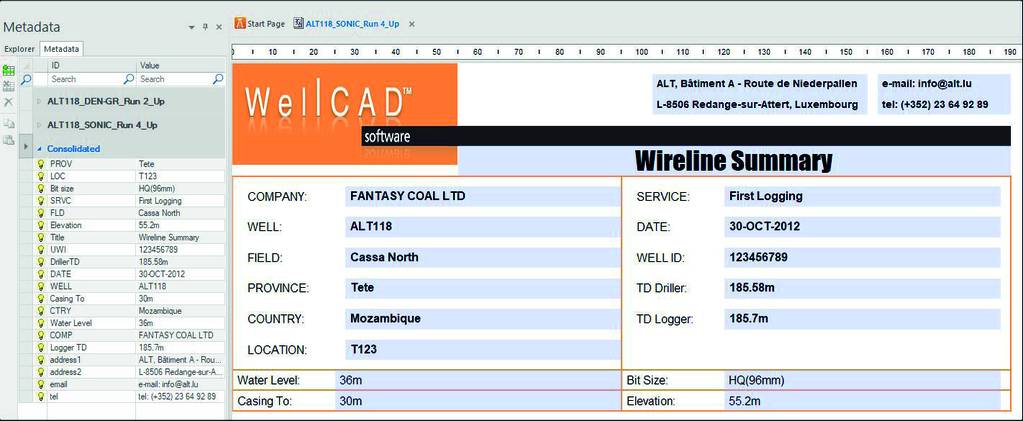
The new Metadata bar (Figure 3) displays the imported information in individual sections for each run loaded into the same document and provides a sortable and searchable database.
Headers will pull the values to display from the metadata repository and show all header fields in the Consolidated section of the Metadata bar (Figure 4). Here the user can conveniently edit, copy & paste, amend and reassign the metadata values shown in the header section.
Improved Log Layout Engine
Arranging logs into an appealing plot layout has been simplified by applying the new Snap Grid. Drag and dropping log title boxes to position the log column is now more intuitive and locked to a user defined invisible snap grid (Figure 5). A handle in the log title box allows resizing the log column width and title height to grid nodes.
The user can drag and drop logs from or to the Explorer Bar to remove or add them to the plot (Figure 6).
Merging of logs has been simplified and can now be accomplished by dragging one log title on top of another while holding down the SHIFT key.
LithCAD and ToadCAD Integration
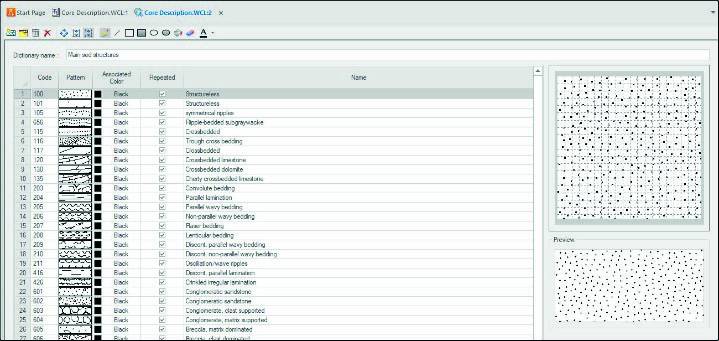
LithCAD and ToadCAD as standalone applications are discontinued. Their functionality has been fully integrated into WellCAD. Upon clicking the ToadCAD or LithCAD icon in the toolbar a new tab will open in the WellCAD workspace (Figure 7) allowing in-place edition of the dictionary embedded in a log, loading of new dictionaries, or saving dictionaries in the known *.lth / *.tad formats for sharing.
Casing Integrity Workspace Extension (Cased Integrity module)
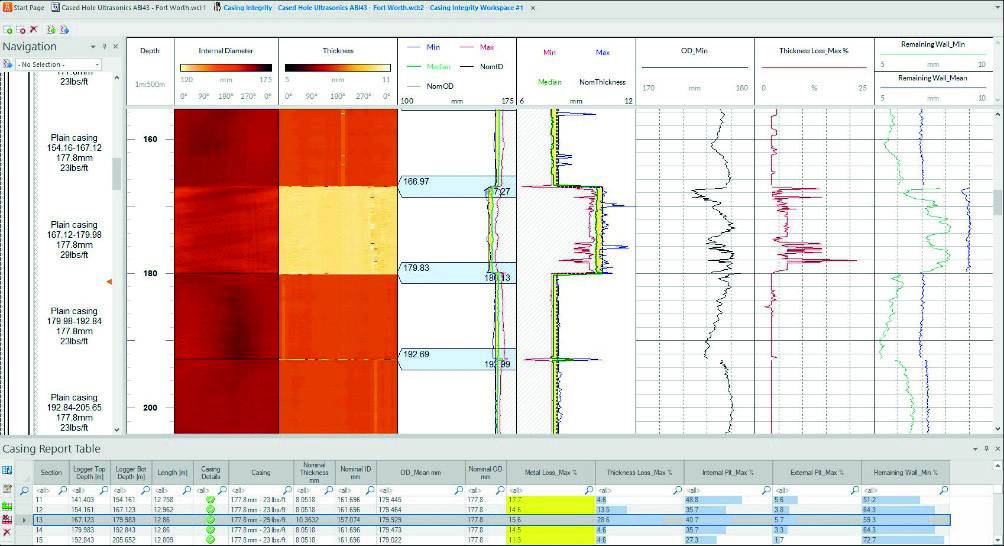
The Casing Integrity module has been extended to handle thickness data along with the internal caliper. Accordingly, a full set of statistics dealing with caliper-only, thickness-only and caliper + thickness can now be calculated in the Casing Integrity workspace (Figure 8).
The initialization and interaction with the workspace were reconsidered. As a result, the workspace starts now with caliper, thickness, and joint logs. Interaction with a driller’s table has been removed.
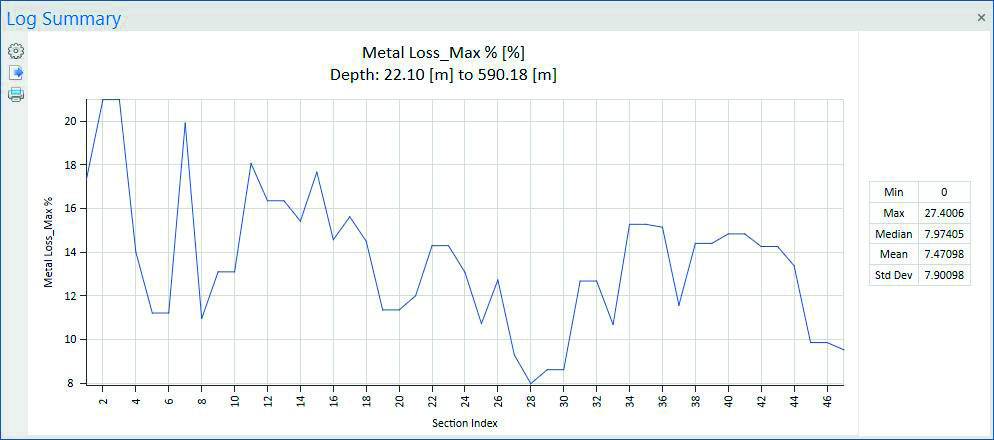
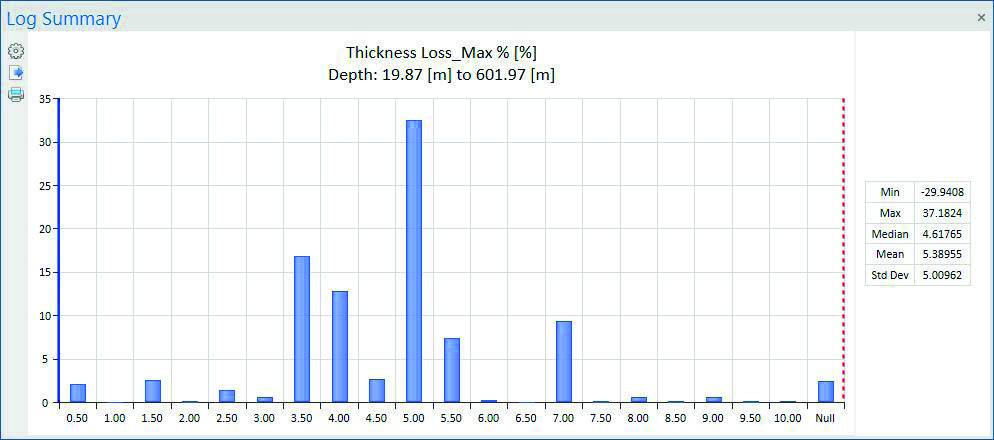
Derived statistics can be plotted against depth, pipe section and as histogram (Figure 9). Columns in the pipe section table can be conditionally filtered.
The improved joint detection process detects joint top and bottom, and can be applied to individual curves (e.g., CCL) and curve arrays (e.g., MFC) likewise. A new histogram-based MFC re-calibration process was implemented.
What’s New Feature List
Look and Feel
- New default theme, icon and splash screen
- Log highlighting uses translucent overlays instead of inverting colours with a big red border
Data to Plot
- File import streamlined:
- At most 1 dialog is shown for
- TFD
- ASCII
- Century
- SEGY
- DLIS
- LAS
- Robertson
- Geo
- No more “OLE Log” insertion dialog when dragging a known file type onto WellCAD
- Merging of logs:
- Happens without a dialog if there are no conflicts
- Can be done by holding SHIFT key and drag and dropping
- Draft and fit mode is now the default view to prioritise on-screen display over print layout
- Metadata handling:
- New metadata bar that stores metadata from all file imports, as well as custom user metadata
- Consolidated metadata is used to populate header/trailer fields
- Metadata is searchable
New layout engine:
- Clicking “Apply snap grid” turns on the new layout engine
- Dragging and dropping of logs to position them is now more intuitive and locked to a snap grid. It makes it much easier to generate nice looking layouts
- Logs can be dragged and dropped on and off the explorer bar to show and hide them
- Resizing of logs is done by dragging and dropping a small handle on the right side of the log header
Casing Integrity Module
- The module now handles thickness data along with internal caliper data
- A full set of caliper-only, thickness-only and caliper + thickness statistics are now calculated
- Joints can now be specified as having a top and a bottom
- A new automatic joint detection algorithm was developed that:
- Allows detection of top and bottom of joints
- Handles CCL data
- Performs better than the previous algorithm
- Initialisation and interaction with the workspace were reconsidered:
- The driller table interaction was completely removed
- The workspace is now started from thickness, caliper and joint logs
- The process bar was removed, and instead common operations are made more intuitive
- Pipe joints detection now occurs automatically on creation of the workspace
- A new histogram based MFC calibration process was implemented
- The statistics table can now be plotted as a histogram, as depth vs. statistic or pipe index vs. statistic
- The statistics table can be conditionally filtered
Python Script Editor
- The built-in script editor now handles running of Python scripts
- A standard Python v3.10 interpreter with pywellcad preinstalled is bundled with WellCAD
- The user has the option of running code in any other registered Python interpreters they have installed on their machine
- The script editor supports syntax highlighting, auto completion and live help to allow users to build up their scripts
- Python scripts are now shown in the File -> Automation menu
Structure Dictionary Editing
- ToadCAD functionality has been fully integrated back into WellCAD
- Users can create and edit structure dictionary files directly in WellCAD
- Users can edit structure dictionaries embedded in existing borehole documents directly in WellCAD
Lithological Dictionary Editing
- LithCAD functionality has been fully integrated back into WellCAD
File Format Compatibility
- WellCAD will now save .WCL files in the oldest file format that supports all functionality used in the document
- Support goes back to v5.3 (as in, WellCAD won’t automatically save the file in a format older than v5.3)
Other Enhancements and Fixes
General WellCAD
- Automatic highlighting of the selected log in the Explorer bar is now a slightly darker colour by default which makes it more visible
- Default theme has been changed to something more modern, and a few extra themes included
- The “Clear contents” command now allows specification of a depth range and only clears data within that range
- Log palettes shown in the dropdown list in the Property bar now include the name of the palette
- When converting a Marker to a Litho log, include the zone from the last marker to bottom of log
Log Display
- Strata logs now show code/name/description
- Comment logs can now have a background colour
- Reduced padding around text on comment logs and strata logs to make things more compact
Licensing
- Activation process should now be more robust and not require adding https://ems.alt.lu to the trusted site list
- License prioritisation is now more sensible
- Customers can automate specifying a license server for WellCAD deployment by setting an environment variable
Cased Hole Ultrasonics
- Thickness calculation algorithm has been improved to reduce the number of unprocessable/null results
- Fixed a problem with some logs being imported upside-down
- The user can now switch between automatic and manual scaling in the wavelet and spectrum plot
FWS
- Automatic vertical scale adjustments in the first arrival picking are now disabled
Data I/O
- TFD import has been revamped, with an intuitive dialog box that allows simple configuration of the import:
- Shows producers of each channel
- Allows selection of which channels are imported
- TFD read speed has been significantly improved
- The user can now specify a depth range for LAS file imports
- Creation of image logs from individual well logs now supports previewing of data and Bezier curve interpolation (upsampling)
- Realtime connection between WellCAD and LoggerSuite now includes a nice channel selection dialog box
ISI
- Implement Retinex image filter for contrast improvements of RGB image logs (same filter done in ObiProc in LoggerSuite)
- Brightness and contrast adjustment has a new dialog that shows a live preview of the process
- Running the brightness and contrast adjustment generates a new log rather than overwriting the old
- Fix a bug where tadpoles and sinusoids sometimes are rendered in black rather that the specified colour
- Fix a bug related to inconsistencies between the confidence and aperture attributes and when they are updated
Casing Integrity
- Conditional testing now allows specifying of a depth range that the process is run over
- Pipe types are now correctly set when “splitting” a pipe by adding a new joint
Process
- RQD can now be output as a percentage
- RQD is now calculated correctly when large fractures spanning the full computation interval are present
- Volume calculation can now be done from X/Y caliper tools using a Bezier fit
- Structure interval statistics can now be calculated over intervals starting from a specific depth
Unit Conversion
- Add conversion between slowness and velocity
- Add conversion from uS/cm to mS/cm
Flowmeter
- The user can specify the run direction for the calibration workspace which allows handling of flowmeter data that isn’t negative for the up run
Multiwell
- Multiple boreholes can be inserted into a multiwell document at once