WellCAD 5.3
Highlights
New in WellCAD Basic
- Collection of Groundwater Processes
- Flowmeter Workspace
- Log Templates
- LAS 3.0 Support
- Enhanced Tabular Editor
- Improved Log Summary Bar
New in CoreCAD
- Full review and extension of the core descriptions workspace
New in ISI & CoreCAD
- Core Image Cropper tool
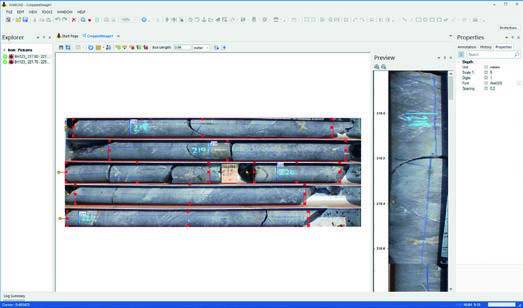
Core Image Cropper
The new and fully embedded core image cropping tool provides an intuitive and easy to use instrument to get more value from your core images
- Extract images from core box or slabbed core photographs
- Depth registration through interactive labeling and box calibration
- Combination into a continuous core image column
- Seamless integration as RGB or OLE log into WellCAD Borehole Documents
- Alternatively export into standard graphic file format
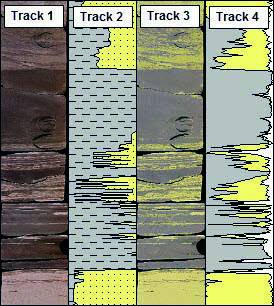
- Full digitalization of data and availability to Color Classification or Color Component Extraction processes
Application examples
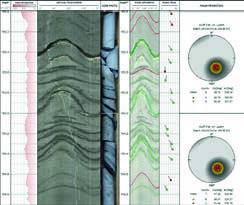
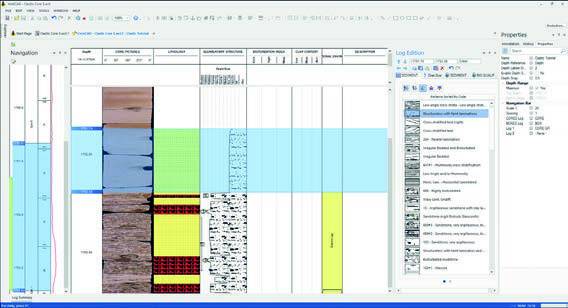
Optical televiewer vs. core image (left) supports structure interpretation and provides depth reference to match core and wireline data; core image used as depth reference in digital core description workspace CoreCAD (right)
Core Description Workspace – CoreCAD
The revised Digital Core Description add-on comes with a new innovative workspace allowing the generation of visually attractive core descriptions (with the look of hand-drawn core sheets) and the acquisition of detailed digital data valuable for petrophysical analysis and reservoir modeling.
The new CoreCAD provides an intuitive and easy to use graphical user interface (GUI) to navigate between core runs and data columns, acquire data by free-hand drawing or interval based data capture and offers the unrivalled flexibility to import, add and export additional data.
Being fully integrated into the WellCAD platform the user has access to all functionalities like Core Image Cropper, Cross Plotting, Color Classification and many more analysis features.
- Innovative and intuitive workspace for core, outcrop and sample logging
- Graphical logging and simultaneous data digitization
- Detailed digital core data is available in each individual data column
- Visually attractive graphical reports.
- Flexible in layout, data organization and logging preference (e.g. free hand or interval based)
- Easy import of additional data columns or generation from Log Templates
- Support of multiple depth reference systems (MD, Core Depth, TVD, …)
- Full integration in WellCAD allowing seamless combination with wireline, image and laboratory data
- Generation of PDF and standard graphical file formats
- Comprehensive data export options for integration of the data into other software
Collection of Groundwater Processes
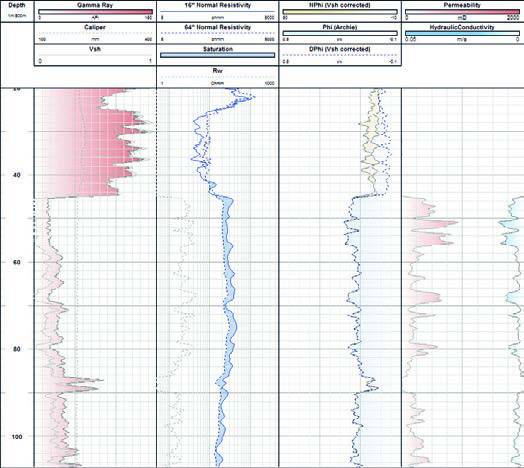
A new Groundwater section with a number of processing tools has been added to the Common Processes menu of WellCAD v5.3.
- Salinity estimation
- Shale Volume Estimation
- Sonic Porosity (Wyllie, Raymer-Hunt)
- Density Porosity (with and without shale correction)
- Porosity estimation using Archie
- Neutron porosity shale correction
- Permeability estimation
- Hydraulic Conductivity
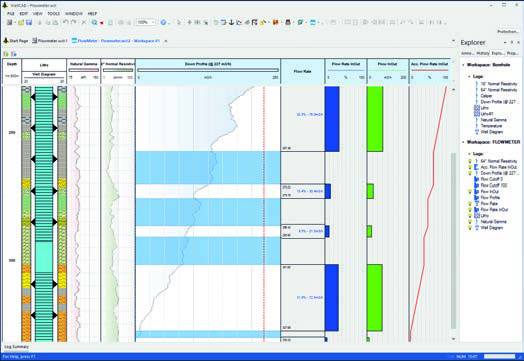
Flowmeter Data Processing Workspace
This first version of the Flowmeter Workspace has been designed to support the interpretation of impeller flowmeter curves.
After initializing the workspace the user can interactively pick identified No Flow zones. The contribution of the flow zones will automatically be computed and displayed as percentage, absolute and cumulated values in text as well as in graphic form.
Additional data such as geophysical logs, lithology columns or well sketches can be added as reference logs to the workspace aiding the interpretation.
Templates can be saved and applied when initializing a new workspace to save valuable time.
Log Templates
This powerful new feature allows maintaining data display standards easily. Stored layout presets can be applied to individual logs in the Borehole Document without rearranging its entire layout through a document template.
Any log layout can be added as log template to the repository. For easier handling multiple repositories (e.g. for wireline and core description logs) can be dealt with at the same time.
LAS 3.0 Syntax Support
WellCAD v5.3 fully supports the import / export of the LAS v3.0 syntax. In a comfortable two-step process all Meta Data as well as depth or time based data can be imported.
Different sections are detected automatically and WellCAD log types can be assigned to point depth or interval based data.
Tabular Editor Review
A first revision of the tabular editor offers row numbers, new display styles, No Data value highlighting, precision settings and saves all formatting options with each individual log.
A wild card supporting Find & Replace option will make data manipulation tasks easier.
Log Summary Bar
New options have been added to the Log Summary Bar display:
- Valuable statistics of the data (such as sample step, number of data, min, max, percentiles and many more)
- Gauss distribution and cumulated frequency overlays
- Interactively to adjust Low / High Scale discriminators
- Export and print options