WellCAD 5.2
Highlights
New modules
- NMR processing add on module
- NMRSA Tool post processing add-on module
- Casing Integrity add on module
New in Image & Structure processing module
- Color classification algorithm for core and optical televiewer images.
New in basic module
- Engineering log enhancements
- Unit converter
- Automated depth matcher
- Log summary bar
- Classifier colors
- New tadpole styles
- Improved three component RGB display
- Composite document
- Native WellCAD PDF
- New page set up options
- Auto recovery
NMR processing add on module
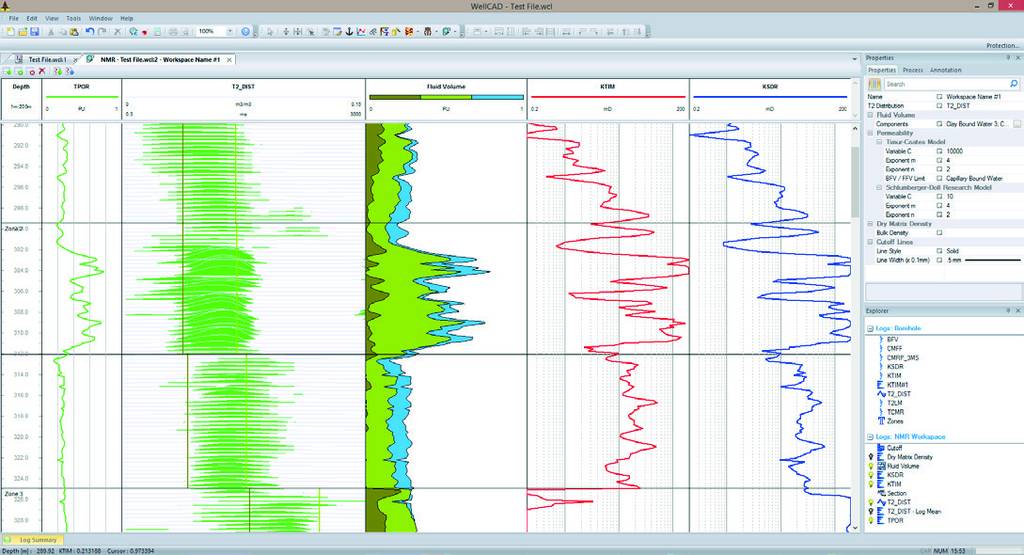
The new NMR module offers a set of processes to derive total porosity, fluid volumes and permeability (Timur Coates and Schlumberger-Doll-Research) from T2 distribution data. It also provides a dedicated workspace where the user can examine T2 data in detail, add T2 cutoffs and adjust the cutoff times for each imported or interactively defined zone individually. While changing the cutoff time on top of the T2 data the fluid volumes and permeability calculations update in real-time and provide an immediate answer product to the user. Workspace and processes are tool manufacturer independent.
NMR SA tool processing add on module
The NMR SA tool processing is an upgrade to the NMR module and supports the post-processing of the raw data coming from the SBTs and LBTs developed by NMR services Australia.
Color Classification
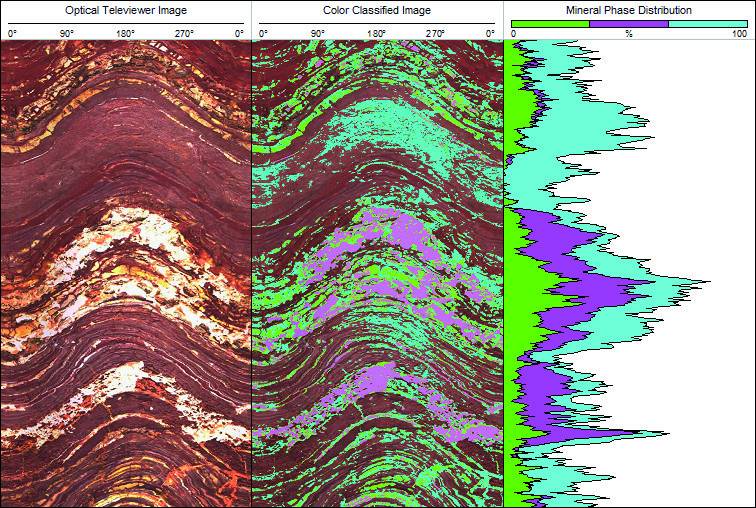
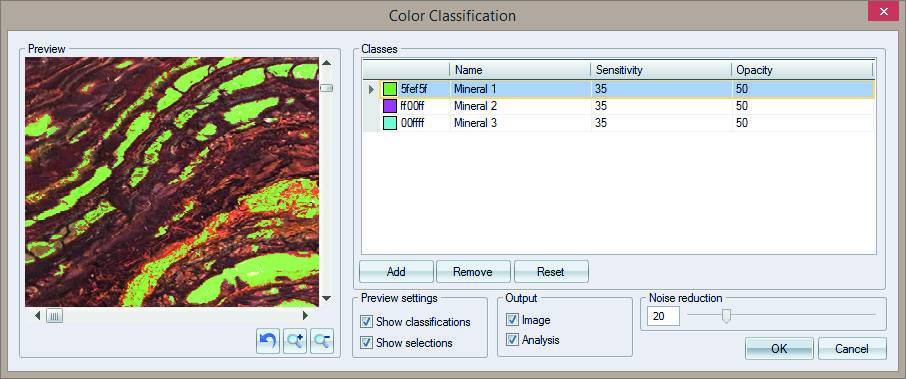
This new process added to the ISI module allows users to classify different minerals or rock types based on their colour in RGB logs. The process generates a colour coded RGB log and an analysis log with the volume fractions of each class. The colour classification algorithm can be applied to optical televiewer images, core scans or core photographs.
Casing integrity module
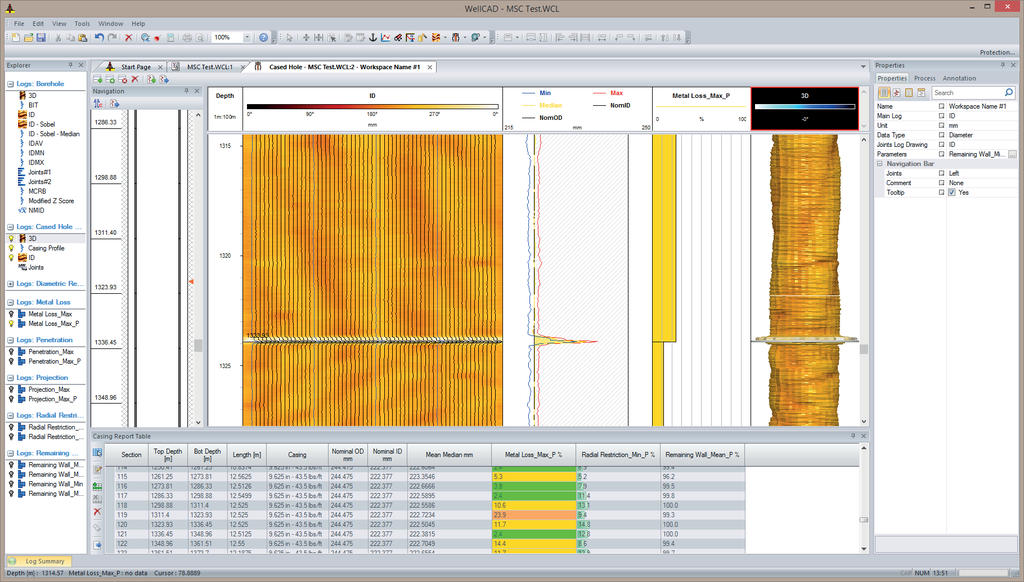
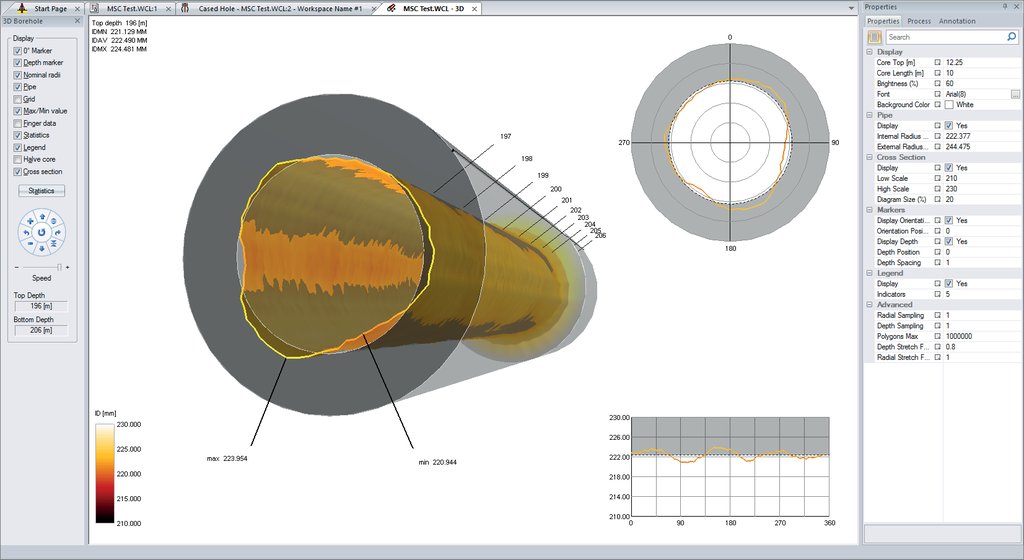
The casing integrity module opens the door to professional cased hole data interpretation and adds a workspace and processing options for multifinger caliper and ultrasonic televiewers to WellCAD.
- Driller’s and detected joint based well sketch displays.
- 2D cross section, vertical profile and 3D virtual well displays dynamically linked to source data.
- Determination of up to 35 statistical parameters derived per pipe section or at each depth.
- Custom pipe grading classification.
- Integration of other cased hole and open data to allow data synthesis.
- Comprehensive and customizable reporting capabilities.
- Binary, ASCII data and graphic export (WCL, LIS, DLIS, LAS, CSV, XLS(X), JPG, PNG, TIF, …)
- Free data viewer “WellCAD Reader”.
- Raw log editing, linear and non-linear depth matching, splicing and merging.
- Shift correction, dead sensor correction, despiking and centralization options.
- Workflows to convert travel times into radius, diameter and thickness, estimation of fluid velocities.
- Automatic pipe joint detection, interactive joint editing, graphical data presentation and joint analysis tables.
Engineering log enhancements
Simply create your well sketch through drag- and-drop interaction using the new engineering bar.
- For each item a designated dialog box opens to adjust the position and display parameters.
- Choose the casing type from an extendable catalog containing by default all API casing and tubing sizes.
- Customize casing and fluid types in the designated editor.
- Allow automatically generated or custom labels being displayed alongside the well sketch.
Unit converter
Converting log data into different units is an essential task and is now easier than ever. WellCAD 5.2 provides an easy to use Unit Converter as part of the BASIC package. Data values of Well, Mud, Interval and Image Log types can easily be converted. The Unit Converter comes with a library of 200+ conversions organized in 20+ categories. The library of conversions can easily be extended and customized using a simple text editor. Conversions can be simple factors or entire formulas.
Automated depth matcher
The depth matcher tool in WellCAD 5.2 provides an option to find and place the depth shifting anchor points automatically based on a cross-correlation algorithm. The user selects a reference log and a correlation partner along with all other logs he would like to depth shift. The algorithm can scan the selected data without user input and suggest depth matching anchor points. If desired the search can be restricted to an interactively defined depth interval for which the algorithm will immediately suggest a depth shift.
Log summary bar
The options for the log summary bar have been extended. Users can now define the number and limits of counting windows interactively or choose from different algorithms for an automatic determination. It is also possible to export the histogram as a graphic file.
Classifier colors
Classifications can be used for various purposes in WellCAD (e.g. grain size distribution, sorting, porosity types etc.).
New tadpole styles
To add more flexibility to the categorization and representation of geological structure picks we have extended the choice of drawing styles for tadpoles. You can now determine fill and outline colour independent from each other to get for example “hollow” tadpoles.
Improved three component RGB display
We have improved the way an RGB Log can be created from up to three Well Logs. The screen shot shows the K, U and The components from a spectral gamma measurement represented as the red, green and blue components of an RGB Log. Simply insert a new RGB Log and select the input components. The algorithm will take care of the rest.
Composite document
If you ever wanted to combine multiple WellCAD documents and headers into a single plot, you can do this now using the composite document. The selection and arrangement of files can even be saved in a composite document.
Native WellCAD PDF
The creation of PDF files out of WellCAD will become easier in the future. WellCAD 5.2 offers a native PDF export option now. No need to create custom page sizes for each plot anymore.
New Page Setup Options
New options such as scaling the WellCAD plot to a fixed paper size and the ability to plot a footer with custom or automatically generated information on each page have been added to the Page Setup dialog.
Auto Recovery
WellCAD 5.2 will automatically save your borehole document at a customizable frequency. Should WellCAD need to close automatically it will now restart with the last saved copy of your work.